Inventory counting software for retail.
Run stock counts with BIX Inventory. Scan product barcodes with handheld devices or smartphones, track your team's progress, and analyze discrepancies against ERP records.

Trusted by Major Brands
Companies from different industries rely on FORBIX technology to make their operations simpler and more efficient.









BIX Inventory
How inventory counting works with BIX
The inventory system connects physical counting with stock discrepancy analysis. Your team records products on scanners or smartphones while managers review results in the portal.
Prepare products and locations
Import product records or integrate with your ERP and map the store locations to be counted. Define the scope to guide the team.
Count with scanners or smartphones
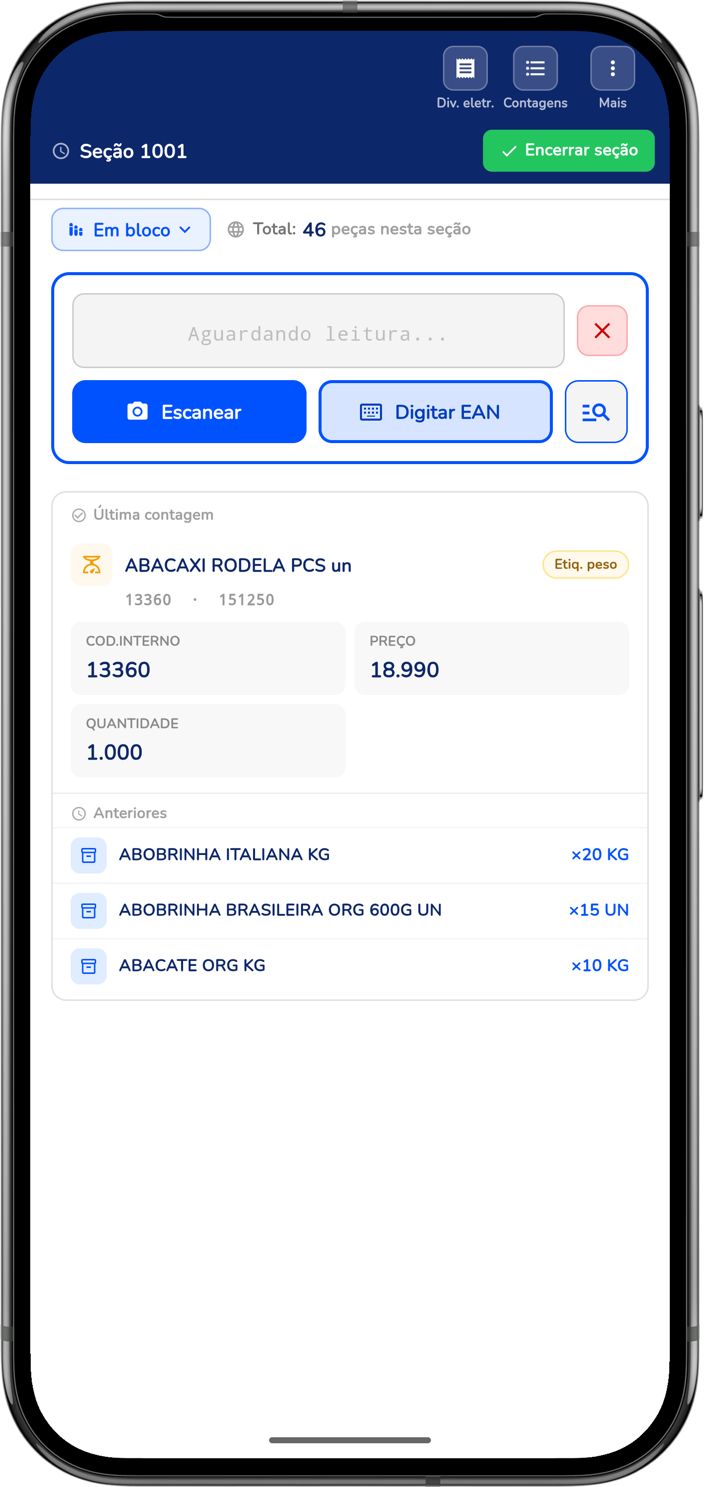
Record products by scanning barcodes. Use case counting and weight-label reading according to the products in your operation.
Analyze discrepancies
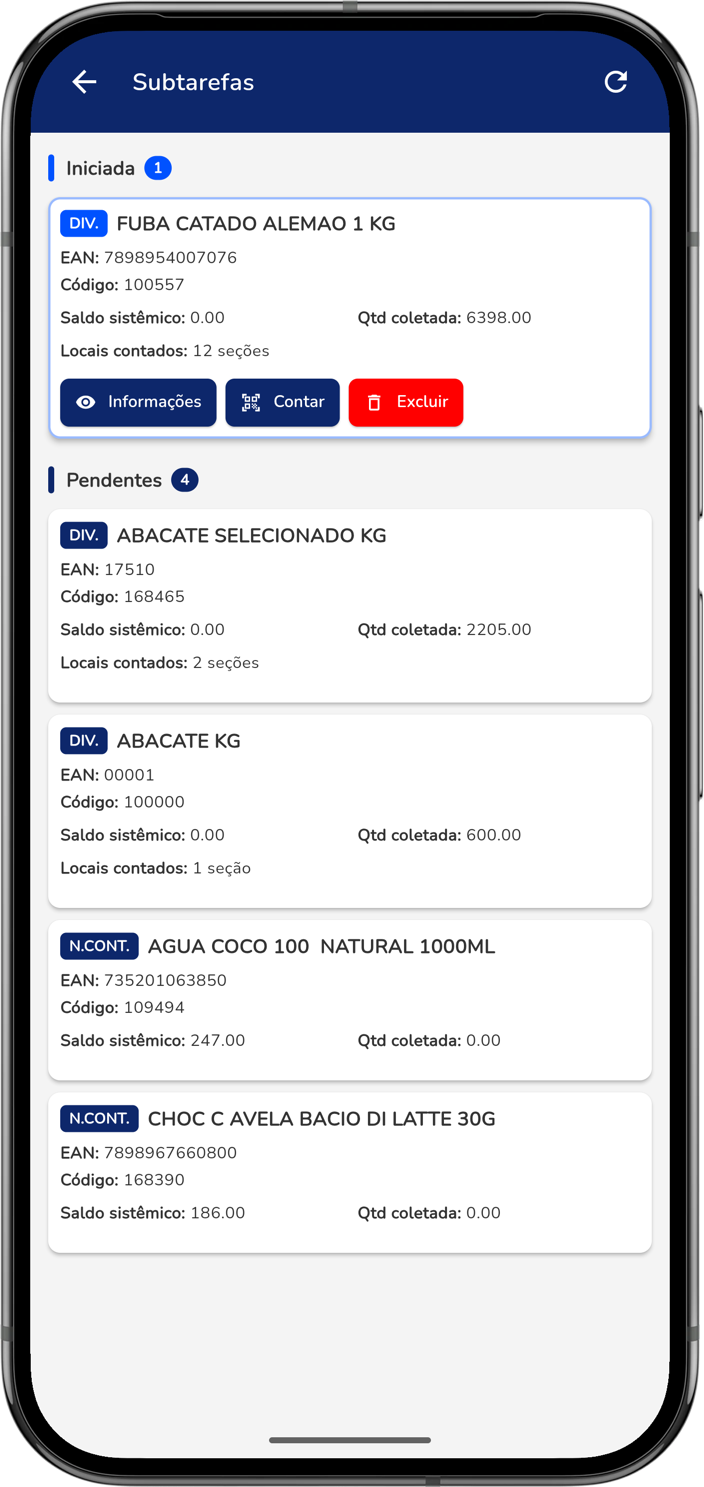
Compare counted quantities with ERP stock records. Prioritize differences and perform additional counts when needed to review the results.
Consolidate the results
Review the history by user, date, and location. Generate results in the format agreed for your ERP to support analysis and stock adjustments.
Agree on rules for stock movements during counting and for recounting differences. Inventory quality also depends on this preparation.
BIX Inventory
Why choose our solution?
A connected operation from the first count to discrepancy analysis, with simplicity for the team and control for management.
Simplified Operations
Simple for Store Teams
An intuitive interface that streamlines counting and increases operational team productivity.
Data Collectors and Smartphones
Run inventories on professional data collectors or smartphones with flexibility and ease.
Web Portal Management
Manage counts in real time through a web portal with clear performance and result indicators.
Store Mapping
Map the store before counting to make sure every stock location is included.
Accuracy and Complete Control
Automatic Discrepancy Detection
Compare counted quantities with system stock and identify discrepancies for more reliable results.
Multiple Counts
Perform multiple counts to increase confidence and accuracy in the final result.
Weight Label Reading
Read any weight-label format and accurately count variable-weight products.
Barcode, Batch, and Expiration Reading
Capture barcode, batch, and expiration information for complete control and traceability during counting.
Integration and Intelligence
Easy ERP Integration
Import products or integrate with your ERP and generate results in the format your system requires.
Case Counting
Count by case and let the system calculate quantities automatically, reducing errors and increasing speed.
Custom Reports and Dashboards
Use reports and dashboards tailored to the needs of your operation.
Audit and Traceability
Maintain a complete count history by user, date, and location for transparency and control.
Questions about inventory software and stock counting
Does inventory software replace the ERP?
BIX Inventory supports physical counting and discrepancy analysis, complementing the ERP. Products can be imported or integrated, and results are generated in the agreed format. Compatibility should be validated during implementation.
Can the team count stock using a smartphone?
Yes. BIX Inventory supports counting with smartphones or data collectors. Equipment and scanning options should be selected according to the products, labels, and volume of work.
When should I use cycle counting or a full inventory count?
Cycle counting spreads counts of product groups over time. A full count covers a broader scope in one event. The choice depends on the objective, discrepancy risk, and team availability; mapping locations and defining recount rules remain essential in both cases.
Solutions that complement your operation
Explore other FORBIX modules to connect processes, reduce losses, and increase control across your stores.
BIX Expiration — Product expiration control
Expiration management software for supermarkets and retailers. Track dates by product and batch, receive alerts in the app, and organize team checks.
Learn More →BIX Checklist — Operational checklists
Create verifications for any process in your store, organize operational tasks, increase team agility, and ensure more control and auditing of information.
Learn More →BIX Preço — Price checks
Audit price tags in your store through the BIX app and, if there are discrepancies, print a new one, ensuring more reliability in pricing.
Learn More →Let's talk
Fill out the form below and our team will contact you soon.